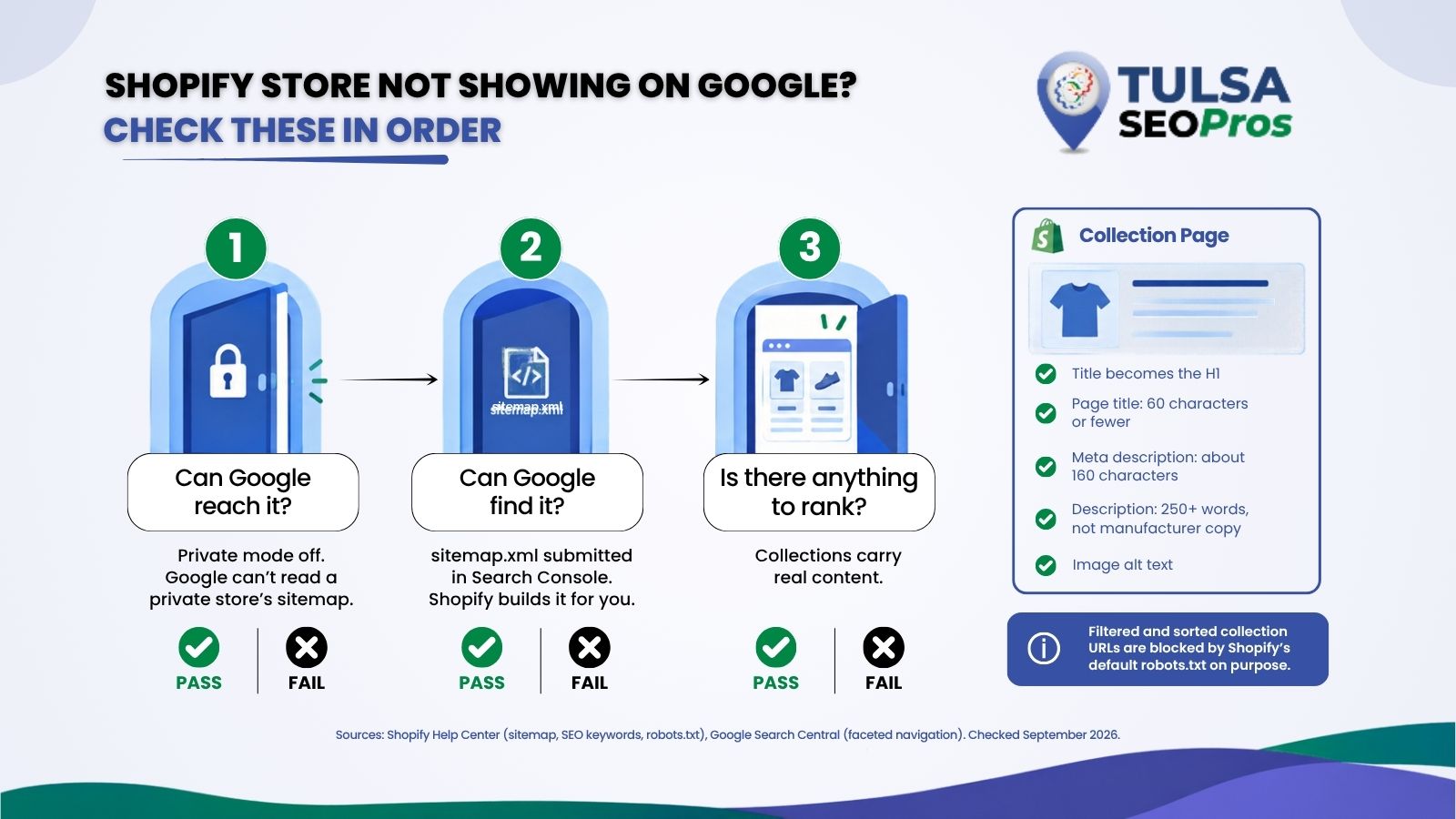
If your Shopify store is not showing on Google, rule out the two blockers first: a store still in private mode, and a sitemap nobody submitted to Search Console. Once those are clear, the usual problem is the collection pages. They are the pages that can rank for a category search like “leather dog collars” or “western boots”, and on most small stores they ship with a bare title, no description, and a grid of photos. Google has little to go on. This guide works through the checks in order for store owners in Tulsa, Broken Arrow, and across Oklahoma.
TL;DR
A Shopify store that is not showing on Google usually has one of three problems. The store is in private mode, so Google cannot reach it or its sitemap. The sitemap was never submitted in Search Console. Or the store is visible but has nothing that can rank for a category search, because its collection pages carry a default title, no description, and no text. Shopify builds the sitemap automatically and already blocks filtered and sorted collection URLs from crawling on purpose, so “Indexed, though blocked by robots.txt” warnings are usually normal. Fix each collection’s page title, meta description, written description, and image alt text; keep product structured data on product pages where Google wants it, and give Google a few weeks to recrawl.
Why Isn’t My Shopify Store Showing Up on Google?
Start with access, then discovery, then content. Checking in that order saves you rewriting copy on a store Google cannot reach.
The sitemap help page in the Shopify Help Center is the place to confirm the first two. It says every Shopify store generates a sitemap.xml automatically, with links to products, pages, collections, and blog posts, and updates it as you add them. It also says Google cannot read that sitemap while the store is in private mode, and that you have to deactivate private mode even to verify the domain in Search Console.
| What you see | Where to check | What it usually means |
|---|---|---|
| Nothing from the store appears in Google at all | Shopify admin, online store preferences | The store is still in private mode |
| No sitemap listed in Search Console | Search Console, Indexing, Sitemaps | The sitemap was never submitted |
| The homepage shows; products and collections do not | Search Console, Pages report | Google has not crawled deeper yet, or the pages have little to index |
| Products show, collections never do | The collection pages themselves | Thin collections: default title, no description |
| “Indexed, though blocked by robots.txt” | Search Console, Pages report | Usually Shopify’s default rules working as intended |
| Google shows a different title than you wrote | View page source on the live page | Google rewrote it; your fields may still be correct |
The same Shopify page is honest about timing. Crawling and indexing take time, and Google does not guarantee how long. A store that left private mode last week is not broken. It is waiting.
Submitting the sitemap takes about two minutes
In Search Console, open Sitemaps under Indexing, type sitemap.xml in the add box, and submit. According to Shopify’s instructions, that is all the file name needs, because the domain fills in for you. If you sell under more than one domain for different countries, each domain has its own sitemap, and each one gets submitted.
Collection Pages Are the Pages That Can Rank for What You Sell
A product page answers a search for one item. A collection page answers the search most shoppers actually start with: a type of thing, a style, a use. That is why collections matter more to an unknown store than any single product.
The collections page in Shopify’s help center describes them as groups of products by category, theme, or customer intent, with examples like lamps, cushions, or rugs, or seasonal products. Once created, each collection can be shown on the store as its own web page with a gallery of the products in it, and Shopify suggests linking collections from your store’s menus so customers can find them. A collection that no menu links to is hard for shoppers and crawlers to reach.
Shopify is also replacing its legacy manual and smart collections with a new collections model, according to the same help page. If the new model is in your admin, your old collections were converted automatically. Nothing in this article depends on which model you have.
Five Fields That Decide Whether a Collection Can Rank
Open any collection in your Shopify admin, and you will find all five of these on the same screen. Shopify’s guide to adding keywords for SEO covers each one, and its numbers are worth following exactly.
- Title: Shopify turns the collection title into the page’s H1. “Boots” tells Google almost nothing; “Women’s Western Boots” names the search.
- Page title (the SEO title): Shopify allows up to 70 characters but recommends 60 or fewer so results are not shortened. Put the main keyword near the start.
- Meta description: Shopify recommends using about 160 characters, unique to each page, written as a sentence rather than a keyword list.
- Description: The text above or below the product grid. Shopify’s guide says every page should have at least 250 words of descriptive text, and that product copy should not be pasted from a manufacturer because other sites already use it.
- Featured image alt text: Shopify lets you set alt text on a collection’s featured image. Describe what the image shows.
Here is what that looks like on a collection that currently says almost nothing:
| Field | Before | After |
|---|---|---|
| Title | Boots | Women’s Western Boots |
| Page title | Boots | Women’s Western Boots in Leather and Suede |
| Meta description | Empty | Leather and suede western boots for women, from work-ready square toes to dress styles, with local pickup in Tulsa and shipping across Oklahoma. |
| Description | Empty | 250+ words on styles, sizing, materials, and care |
| Image alt | IMG_2231 | Three pairs of women’s western boots in tan, black, and brown leather |
The pickup line in that example only belongs in your copy if the store really offers it. The point is the shape of the page, not the words.
Why Google may still show a different title
Search engines can rewrite page titles, and the same keyword guide says so directly: they may change titles and meta descriptions based on the page content. If Google shows something else, view the page source and check the title tag and meta name=”description” tag. If they match what you typed in the admin, your setup is right, and the difference is Google’s choice.
Tags, Filters and Sort Orders Are Blocked on Purpose
Shopify stores ship with a default robots.txt that stops Google from crawling most filtered and sorted collection views. Shopify’s help page on its default robots.txt lists the two rules that matter here.
| Default rule | What it blocks | Shopify’s stated reason |
|---|---|---|
| Disallow: /collections/*+* | Filtered collection pages | They duplicate content already on the collection page |
| Disallow: /collections/*sort_by* | Sorted collection pages | They return the same products in a different order |
This is why Search Console often lists “Indexed, though blocked by robots.txt” on a Shopify store. The Shopify page calls it normal behavior and usually not a cause for concern. It only needs attention when a page you want ranked, such as the homepage, carries the warning.
Google agrees with the approach. Google’s guidance on faceted navigation URLs says filter parameters can create an almost infinite number of URLs, which leads to over-crawling and slower discovery of the pages you care about. Its suggestion, when you do not need filtered URLs indexed, is to block them and let Google crawl the individual item pages plus a listing page that shows all products without filters. That is Shopify’s default arrangement.
Leave the robots file alone unless you have a specific reason. Shopify calls editing robots.txt.liquid an unsupported customization and warns that incorrect use can result in loss of all traffic.
When a filter deserves its own collection
Sometimes a filtered view is the page a shopper is searching for. Someone typing “red rain boots for kids” wants that filtered set, and a blocked filter URL cannot rank for it. The answer is a real collection, not an unblocked filter:
- Build a collection with conditions that pull the matching products automatically.
- Give it its own title, description, and meta fields, per the five fields above.
- Link it from the parent collection’s description and from your menu.
This is also the honest answer to “do Shopify tags help SEO”. Tags help you build collections and filters. The tag-filtered URLs themselves are kept out of the crawl by default, so the ranking work happens on the collection you build from them.
Should Collection Pages Have Product Schema?
No. Google’s merchant listing structured data documentation, updated this month, says product rich results support only pages that focus on a single product or its variants, and that “shoes in our shop” is not a specific product. It recommends adding markup to product pages rather than pages that list products or a category.
Most Shopify stores already have this handled. According to the sitemap help page, current Shopify-supported themes include structured data on product pages by default, covering prices, availability, and reviews, with no extra code. Before paying for a schema app that promises markup on every collection, check what your theme already outputs on product pages. That is where Google wants it.
Writing Collection Copy a Tulsa Shopper Would Read
Collection descriptions are where a local store sounds local. If you sell from Tulsa and ship statewide, or offer pickup in Jenks and Bixby, that belongs in the description and the meta description, because it answers the question a nearby shopper has before they buy.
A short checklist for each description:
- Open with what the collection is and who it is for, in the words a shopper would search.
- Explain the differences inside the collection: materials, sizes, uses.
- Mention pickup, delivery, or local service only where the store actually offers it.
- Write it yourself. Shopify’s guide warns against manufacturer copy that other sites already carry.
- Link to one or two related collections by name.
Owasso and Broken Arrow shoppers can buy from anyone online. The reason to buy from a store in Tulsa County is usually faster pickup, a real person to ask, or a product selection chosen by someone who knows the area. Say so where it is true. Local businesses competing with national retailers have to show that difference on the page, which we cover in how local businesses compete with national brands in search.
How Long Until Google Picks Up the Changes?
Weeks, usually. The keyword guide says edits can take a couple of weeks to show in results, and that after using Search Console’s URL Inspection tool to request indexing, a recrawl can take several days to a few weeks.
| Step | What to do | What to expect |
|---|---|---|
| After editing a collection | Request indexing in URL Inspection | Recrawl in days to weeks |
| After leaving private mode | Submit sitemap.xml | No guaranteed timeline, per Shopify |
| After the first month | Check the Performance report for the collection URL | Impressions before clicks |
Watch impressions on the collection URL before worrying about clicks. A collection that starts appearing for category searches is working, even at a low position.
Rewrite Your Best-Selling Collection First
Pick the one collection that holds your best sellers and fix it this week: title, page title, meta description, a real description, and alt text. Then request indexing and leave it alone for a month while the others get the same treatment. If your store has not been set up to sell yet, start with getting a Shopify store set up and selling.
If the store has deeper problems, such as a custom theme that hides collections from the menu or filter links that never render as real links, that is theme work. The Shopify development work we do for Tulsa stores covers themes, migrations, and the SEO fields behind them, and a full SEO audit of the store will show which collections to fix first. Send us the store URL, and Tulsa SEO Pros will tell you which of the three problems you have.