The second shop opens, somebody copies the city page, swaps the town name and the phone number, and publishes. Three months later, the original page has slipped, and the new one never arrived. Nobody connects the two events, because on the surface nothing was taken away from the first location.
TL;DR
A second location is the point where a local business stops competing only with other companies and starts competing with itself. The mechanism is not mysterious: two pages that say the same thing about the same service give Google a choice it did not previously have to make, and Google’s own documentation is explicit that when you do not tell it which version you prefer, it decides for you. The fix is structural rather than clever. Give each location a page that could not be find-and-replaced into the other, point every signal you control at the version you want ranked, and keep the two Google Business Profiles genuinely separate, because posting the same content to both is prohibited by name in Google’s own policy. Do that before the second location opens, and it is a small job. Do it after the rankings move, and you are unpicking six months of decisions.
Why the Second Page Costs You the First
Understand the mechanism, and the rest of this page follows from it.
Google’s guidance on canonicalization describes what happens with duplicate or very similar pages. You can indicate a preference, and the methods it lists work in a specific order of strength: redirects are a strong signal, a rel=”canonical” annotation is a strong signal, and inclusion in a sitemap is a weak one. Those methods stack, so combining them raises the chance of your preferred URL being the one that appears.
Then comes the line that matters most for a second location. Google states that none of these methods is required, and that if you do not specify a canonical URL, it will identify which version it considers the best to show users in Search. It is written in Google’s documentation on specifying a canonical URL.
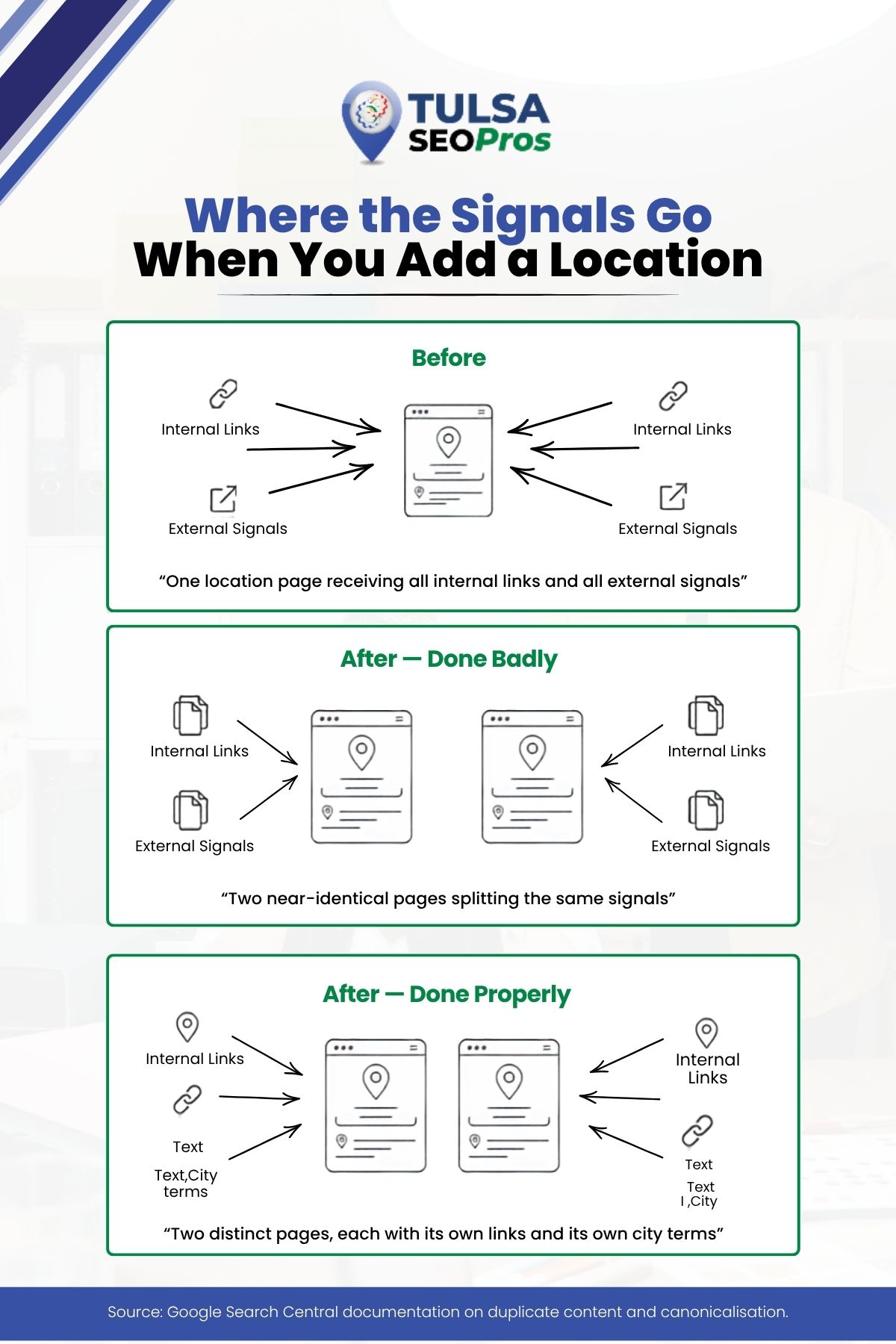
Read that as a business owner rather than as a technician. You have handed a decision to a system with no view of which shop you want busy. It may pick the older page, which is usually better linked. It may pick the newer one. It may alternate. Whichever it picks, the signals that were concentrated on one page are now spread over two, and the same document explains that consolidating those signals into a single preferred URL is one of the reasons the mechanism exists at all.
The reason this surprises people is that nothing was deleted. The first page is still there, still says what it always said. It simply now has a near-twin.
How Similar Is Too Similar?
There is no published threshold, and anyone who quotes you a percentage is inventing it. The useful test is practical rather than numerical.
Take the second location’s page and find-and-replace the town name with the first town’s name. If you now have the first page, the two pages are the same page.
That test catches almost every version of this problem, because the way these pages get made is exactly that operation run in reverse. It also tells you what the fix has to be: content that would break if you swapped the town.
| Reads as one page | Reads as two |
| Same service list, same order, same wording | Services ordered by what that location actually does most |
| Town name inserted into generic sentences | Named neighbourhoods, roads, landmarks the branch actually serves |
| Same stock photography | Photographs of that building, that team, that work |
| Identical FAQs | Questions that location genuinely gets asked |
| Same opening hours block copied over | That location’s real hours, including where they differ |
None of that is a trick. It is the difference between a page about a place and a page with a place name in it.
Point Every Signal You Control
Once the pages are genuinely different, the job is to stop sending mixed messages about which page belongs to which town.
The signals worth auditing, in rough order of how often they are wrong:
- Internal links. The most common error is that every internal link on the site still points at the original location page, because that is what the template did. The new page has no internal support and the old page gets reinforced as the answer for both towns
- The navigation. A single “Contact” or “Service Area” entry that leads only to location one tells the site’s own structure that location two is secondary
- Sitemap inclusion. A weak signal in Google’s list, but free and frequently missed when a page is added outside the normal flow
- Canonical tags. Check that the second page is not self-cancelling by carrying a canonical pointing at the first, which some themes and plugins do when a page is duplicated to create it
- Structured data. Each location’s markup should describe that location, with its own address and hours, rather than repeating the head office
The canonical point deserves a second look, because duplicating a page inside a CMS to create the new one is exactly how a wrong canonical gets copied along with the layout. Google’s documentation notes that in a CMS you may not be editing the HTML directly and the setting lives in the platform’s own search settings instead.
Our guide to local SEO services in Tulsa covers the underlying signals in more depth, and what local SEO is and why Tulsa businesses invest in it is the starting point if this is new territory.
The Google Business Profile Rule That Catches Multi-Location Owners
This one is a policy, not a technique, and breaking it puts a listing at risk rather than merely costing rankings.
Google’s prohibited and restricted content policy for Business Profiles names duplicate posting directly, describing “posting the same content multiple times either from the same account or multiple accounts” as not allowed. The policy is published on Google’s prohibited and restricted content page for Business Profiles.
Now consider how a second location is usually run. One person writes the month’s posts and pastes each one into both profiles, because it is the same business and the same offer. That is the prohibited pattern, described almost word for word.
The practical consequence is that a posting calendar for two locations is two calendars. The offer can be the same; the copy cannot. In practice, that means writing each post to the location it belongs to, which is easier than it sounds once the two pages have genuinely different content to draw on, and impossible when they do not.
The same reasoning applies to profile descriptions, to photographs, and to the answers you give. Two textually identical profiles are two profiles telling Google they are one business filed twice.
More on the profile side is in our piece on how a local SEO agency handles Google Business Profile optimization.
Service-Area Businesses Have the Same Problem, Differently
A trades business with two vans and no second shopfront hits this from the other direction, and it is worth separating because the advice diverges.
There is no second address to build a page around, so the temptation is to build a page per town instead, and that is where the cannibalisation gets worse rather than better. Ten town pages generated from one template are ten near-identical documents competing with each other and with the service page above them. The find-and-replace test fails on all of them at once.
What works instead is fewer pages, each earning its place. A page for a town is worth having when there is something true to say about working in that town that is not true of the others: a different response time, a different set of common jobs, a different regulation, a named area you genuinely cover from a depot nearby. Where that is not true, the honest structure is one strong service page that names the coverage area, not a page per name on the map.
The profile side differs too. A service-area business shows a coverage area rather than a street address, and running a second profile for a town you merely drive to is a different policy problem from the duplicate-posting one described above.
The audit that finds this in an hour
If you already have location pages and are not sure whether they are competing, three checks answer it quickly.
Search your own site for each town name in Google, restricted to your domain, and see how many pages come back for each. More than one strong candidate per town is the signal. Then search each town name plus your main service without the site restriction and note which of your pages Google actually returns, because that is the page it has already chosen. Finally, open two of your location pages side by side and run the find-and-replace test on them.
None of that needs a tool. It needs an hour and a willingness to look at the answer.
The Order That Actually Works
Sequence matters here more than in most SEO work, because the expensive mistakes are made early and discovered late.
Before the second location opens, decide the URL structure for locations. One consistent pattern, applied to location one as well, even though it currently has the site to itself
Move location one onto that structure first, with a redirect, and let it settle. A redirect is a strong canonical signal in Google’s own ordering, so this is the moment to use it cleanly
Write location two from scratch. Not from a copy. This is the single decision that prevents the whole problem
Build internal links to location two from relevant service pages and articles, so it is not launched as an orphan
Create the second Business Profile with its own address, hours, photographs, and description
Split the posting calendar into two before the first post goes out, rather than after somebody notices
Steps three and six are the ones that get skipped under time pressure, and they are the two that cause the problem this article is about.
What if it is already done wrong?
It is recoverable, and it is slower than doing it right. The order is: differentiate the content first, then fix the canonical and internal linking, then leave it alone long enough to be measured. Changing everything at once means you find out nothing about what worked.
Resist the instinct to delete the newer page. Deleting removes the competition and also removes whatever it had earned. Rewriting keeps both.
Two Locations, Two Sets of Numbers
The last piece is measurement, and it is where the problem is usually first visible.
Track each location page separately from the day the second one exists, and track each profile separately too. The signal to watch is not total traffic, which can stay flat while the split is happening underneath. It is whether the queries containing town one still land on page one, and whether the queries containing town two have started landing anywhere at all.
A pattern worth knowing: when this goes wrong, the second location’s own town name often still returns the first location’s page. That is the clearest single symptom, and it usually appears well before anybody notices a revenue change.
Trade-specific versions of this show up constantly. Our notes on local SEO for plumbers ranking in Tulsa map results and on content for local audiences both touch the same structural questions from a different angle.
Plan the Second Location Before It Opens
The cheapest version of this work happens before there is anything to fix, and the most expensive version happens eight months after the ribbon is cut. If a second location is on the calendar, the URL structure, the content plan, and the profile setup are worth settling now. Tulsa SEO Pro handles SEO for growing local businesses, and a quote request is the fastest way to get the structure looked at before it is baked in.