Website traffic but no leads usually means a visit is leaking somewhere between the search and the phone, and the first place to look is not the website at all: it is whether anyone is counting the calls and forms that do happen. After that, check whether the visitors could ever hire you, whether a phone user can call in one tap, whether the number shows up quickly, whether the page names your towns, and whether the form asks too much. Each check below is something an owner can run in about ten minutes, before paying anyone to redesign anything.
TL;DR
When a site shows website traffic but no leads, work down a short fault tree before buying more visitors. Start by confirming the leads are counted at all, because Google Analytics 4 treats a purchase as a key event by default, while a contact form or a call tap has to be set up and marked by someone. Then read your Search Console queries and ask whether each searcher could hire you, tap the phone number on your own phone, and compare how the page loads against the Core Web Vitals targets on web.dev. Finish with the page copy and the form: the page should name the towns you serve, and the form should ask only for what you need. Two leaks sit outside the website: calls from a Business Profile call button and calls nobody answers, and website analytics records neither.
The Leak Map, From Search to Phone Call
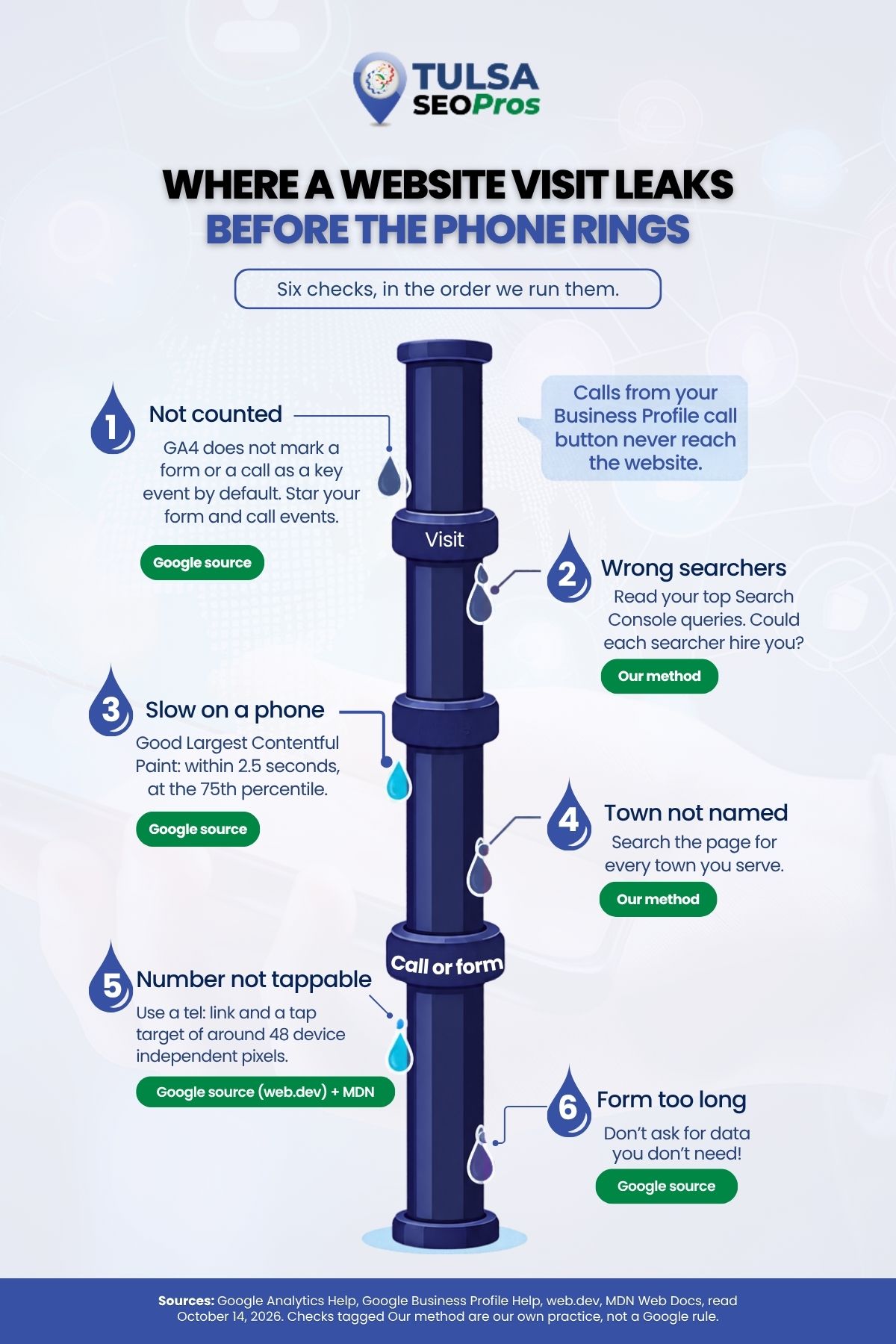
Think of the path as a pipe with three joints: the visit, the page, and the call or form. Leads drip out at the joints. The table is the whole method on one screen, and the sections after it take one row each.
| Where it leaks | The question | The ten-minute test | What the check rests on |
|---|---|---|---|
| Counting | Are calls and forms recorded at all? | Look for a starred form or call event in GA4 | Google Analytics Help |
| The visit | Could these searchers hire you? | Read your top queries and mark each one yes or no | Our method, using Search Console |
| The tap | Can a phone user call in one tap? | Tap the number on your own phone | MDN Web Docs and web.dev |
| Speed | Does the number show up quickly on a phone? | Load the page on cellular data and watch | web.dev thresholds; the stopwatch is ours |
| Place | Does the page say where you work? | Search the page text for each town | Our method |
| The form | Is the form asking too much? | Count the fields, then compare starts to submits | web.dev and Google Analytics Help |
Work the rows in order. A counting gap makes every other test unreadable, so it goes first.
Are Your Calls and Forms Being Counted at All?
Often they are not, and it is the cheapest leak to rule out. In Google Analytics 4, any event you collect can become a key event, but only once someone marks it as one. Google’s help page on key events describes the whole idea in one line: identify the event that measures the action, then mark it as a key event so it shows in your reports.
The default list is short and built for stores. On the page about marking key events, Google lists purchase as the one web event GA4 marks on every property. The other defaults are app events, plus browsing and shopping events such as add_to_cart and begin_checkout that are marked only when Ads Personalization is on with a linked Google Ads account.
None of them is a form or a call. A plumber in Owasso or a roofer in Bixby sells nothing through a cart, so their form submissions and call taps stay ordinary events until someone starts them.
What GA4 can see without new code?
Turn on enhanced measurement, and GA4 records two form events by itself. According to the enhanced measurement page, form_start fires the first time a visitor interacts with a form in a session, and form_submit fires when they send it; comparing the two shows how many people started a form against how many finished. Neither is a key event until you mark it.
If your form sends people to a thank-you page, Google’s help on creating events walks through building a new event from the page_view of that one URL, then marking it as a key event, all inside the Analytics admin.
Two limits are worth knowing before you start. The marking page says a change “doesn’t change historic data”, so last quarter’s missing leads stay missing. It also says to allow up to 24 hours for a new key event to appear in standard reports.
Calls that never touch your website
Some of the calls missing from analytics never loaded your site. The Business Profile performance help defines the Calls metric as the number of times a customer clicked the call button on your Business Profile. That tap happens on Search or Maps, so in our reading, the website’s analytics has nothing to record. Before deciding the website failed, open Performance on your profile and set those calls beside the GA4 numbers for the same month.
Paid clicks carry their own catch. The Google Ads Help page on phone call conversion tracking lists five ways to count calls, and for clicks on a number on your mobile website it says Google “can only track these clicks, not the phone calls themselves.” Counting real calls from the number on your site takes a Google forwarding number and a minimum call length that you choose.
The counting test
- In GA4 Admin, under Data display, open Events and look for a star beside a form or call event.
- If nothing is starred, open your web data stream and confirm enhanced measurement is on, form interactions included.
- Open your Business Profile, click Performance, and write down Calls and Website clicks for last month.
- If you run Google Ads, check which call conversion type is active and whether it counts taps or calls.
If step one turns up nothing, stop and fix it. Every later test reads the same broken scoreboard.
Is the Traffic Coming From People Who Could Hire You?
Check this in Search Console, not in a visits chart. The Search Console Performance report helps count a click each time a user clicked your site from Google Search results. GA4 counts sessions instead, and its organic search traffic report helps count a session as engaged when it lasted 10 seconds or longer, had one or more key events, or had two or more page or screen views. The two tools count different things, so read each one for what it measures rather than expecting them to match.
Once the two are linked, that GA4 report puts Search Console clicks beside engaged sessions and key events for each landing page. It ships unpublished, and the Search Console collection has to be published from the Library before it appears in the menu. A landing page with steady clicks and no key events is where we would look first.
Read the queries like a dispatcher
Our method here is plain. Open the Queries tab, sort by clicks, and read the top twenty out loud. For each one, ask a single question: could the person who typed this hire us this month, from where they live?
A Jenks plumber whose clicks come from people reading how to stop a running toilet has traffic, and most of those readers were never going to call. A Tulsa roofer drawing clicks from a town well outside the service area has the same problem with a map pin on it.
The Performance report helps add a caution. You might not see your site when you run the same query yourself, because results depend on the time, place, device, and recent history of the person searching. Judge the list from the report, not from your own phone.
| What the top queries look like | What it usually means | Where the fix lives |
|---|---|---|
| Mostly how-to questions | Readers, not buyers | A clear next step on those pages, or accept them as readers |
| Mostly your business name | People who already know you | The other rows of the leak map |
| Towns you do not serve | Wrong geography | The service area wording, page by page |
| Services you do not offer | Wrong topic | Rewrite or retire the page that ranks |
Can Someone on a Phone Call You in One Tap?
Yes, if the number is a real tel: link, sits where a thumb can reach it, and the page fits a phone screen. MDN Web Docs, in its reference for the HTML anchor element, documents tel: links for telephone numbers and notes that on cellular devices the link dials the number. A number typed as plain text, or set inside a logo image, cannot be tapped, so the visitor has to remember it or copy it by hand.
Size matters as well. web.dev’s guidance on accessible tap targets recommends a minimum touch target of around 48 device-independent pixels, with targets spaced about 8 pixels apart so a finger on one does not press the other. A call button wedged between a menu icon and a search icon is the kind of header that fails it.
The page also needs a viewport meta tag. Without one, according to web.dev’s responsive design basics, a page “loads very zoomed out”, which leaves the phone number as small text the visitor has to pinch to read.
Run this on your own phone, one hand only, the way a customer standing in a driveway would:
- Tap the number in the header. Does the dialer open with the right number already in it?
- Tap the number in the footer and on one service page.
- Check that the number matches across the site and on your Business Profile.
- Rotate the phone. Does the call button stay visible and tappable?
How Fast Does the Number Show Up on a Phone?
Fast enough that the visitor never wonders where it went. The measure Google publishes for loading, responsiveness, and layout is Core Web Vitals, and web.dev’s Web Vitals page sets the good thresholds at the 75th percentile of page loads, measured separately on mobile and desktop.
| Metric | What web.dev says it measures | Good |
|---|---|---|
| Largest Contentful Paint | Loading performance | Within 2.5 seconds |
| Interaction to Next Paint | Interactivity | 200 milliseconds or less |
| Cumulative Layout Shift | Visual stability | 0.1 or less |
The 75th percentile is the part owners skip. A page can feel fine on the office desktop and still be slow for a large share of the people loading it on a phone. Layout shift is the quiet one, in our view: the page jumps as a banner loads, and the thumb meant for the call button lands on something else.
Connection quality is not a given here either. Census QuickFacts, drawing on the 2020 to 2024 survey, puts households with a broadband internet subscription at 91.4 percent in Tulsa County and 94.4 percent in Broken Arrow, and households with a computer at 96.0 percent and 97.8 percent. Read the other way, 8.6 percent of Tulsa County households reported no broadband subscription. They still need roofers and plumbers, and a heavy page asks the most of them.
The stopwatch test we use is not a Core Web Vitals measurement, but it is honest. Turn off Wi-Fi, load your busiest landing page on cellular data, and count until you can see and tap the phone number. If you are still counting after the first few seconds, the page needs work before it needs more visitors.
Does the Page Say Which Towns You Serve?
It should, in words a visitor finds without scrolling to the footer. Someone in Broken Arrow who lands on a page that only says “Tulsa” has to guess whether you will drive out, and a guess is where a call stops. The same QuickFacts table counts 44,384 households in Broken Arrow and 272,422 across Tulsa County, so the suburb is far from a rounding error.
This is our method, not a Google rule. Name the towns on each service page, keep one phone number across the site and the Business Profile, and say plainly where you do not go. Our construction company SEO guide makes the same case from the contractor’s side: a quote request form near the top of the page, project photos organized by service type, and a page for each city or area served.
The test takes two minutes. Use Find in Page on your phone and search the service page for each town on your list, whether that is Tulsa, Owasso, and Jenks or somewhere else entirely. A town missing from the page that should mention it is a reader you have asked to guess.
Is the Contact Form Asking for More Than You Need?
Count the fields first. web.dev’s guidance on address forms puts it bluntly: “Don’t ask for data you don’t need!” It calls removing unnecessary fields the simplest way to make a form easier. A first service request needs a way to reach the person and a line about the job; the rest can wait for the call back.
The same guide covers the phone field. Use type=”tel” so a phone shows the number keypad, and use one input for the whole number instead of splitting it into boxes, which web.dev says makes entry easier and lets the browser autofill it. The forms course on the same site adds that the right autocomplete values let the browser fill other fields for the visitor too.
Then read your own visitors. With enhanced measurement on, GA4 shows form_start and form_submit side by side. Plenty of starts and few submits point at the form itself. Few start points back up the tree, at the page or the traffic.
If many of your requests arrive after the office closes, a chat window can take the details, though it does not replace a person answering a job question. Our piece on AI chatbots and live chat weighs where each one fits.
The Leak After the Phone Rings
One leak sits outside the website entirely. A call that rings out late on a Friday afternoon was a lead the site delivered and the business lost.
That is why the monthly numbers we tell trade owners to ask for put unanswered calls on the first page of the report. If only answered calls get logged, the website looks worse than it is, and the fix gets aimed at the wrong joint.
When the Website Really Is the Problem
Sometimes the counting works, the searchers are the right ones, and the leak still shows at the tap, the load, or the form. Then the fix is on the site. Some of it is a setting. Some of it means rebuilding templates, and that is usually the point where an owner needs a developer rather than another plugin.
| Leak found | Often a quick change | Often a rebuild |
|---|---|---|
| Number cannot be tapped | Wrap it in a tel: link | Number baked into a header image on every template |
| Page loads zoomed out on phones | Add the viewport meta tag | A theme that was never built to resize |
| Number shows up late | Compress the largest image above it | A page builder loading heavy scripts on every page |
| Long form | Remove fields | A form wired to a system that demands them |
The rebuild column is the work our Tulsa web development team takes on. The service page lists website redesign and migration for sites that are “outdated, slow, or failing to meet your business goals”, along with mobile-first builds and ongoing maintenance. If you run WordPress and want to stay on it, the WordPress web design page covers redesigns on the same platform.
Run These Checks Before You Buy More Traffic
Set aside an hour this week and go down the leak map.
Start the form and call events in GA4, then read the top queries in Search Console. Tap your own number. Load the page on cellular data. Search the page for your towns and count the form fields.
Write down which row leaked, because that row decides who fixes it. A counting gap is an analytics job, a query problem is a content and targeting job, and a slow or untappable page is a development job. More visitors poured through the same leak only make it bigger.
If the trail ends at the website, contact us with your notes and the pages involved. Our web development page offers a free consultation, and Tulsa SEO Pros would rather start from your list than from a blank brief.