Google Ads for plumbers goes wrong in the settings long before it goes wrong in the ads. Five defaults do most of the damage we find in plumbing accounts: location targeting that reaches people outside the service area, search partner sites switched on, ads running all day while nobody answers the phone, broad match keywords with a thin negative list, and recommendations Google applies on its own. Each one is a setting a Tulsa, Broken Arrow, or Owasso plumber can check in about twenty minutes.
TL;DR
Five defaults described in Google’s own help pages deserve a second look in a plumbing account. Location targeting defaults to “Presence or Interest”, which includes people who only showed interest in your area; “Presence” limits ads to people in or regularly in it. Search partners are included by default in new Search campaigns. Ads run “All day” unless you set a schedule, and call assets can be scheduled separately to show only when someone answers.
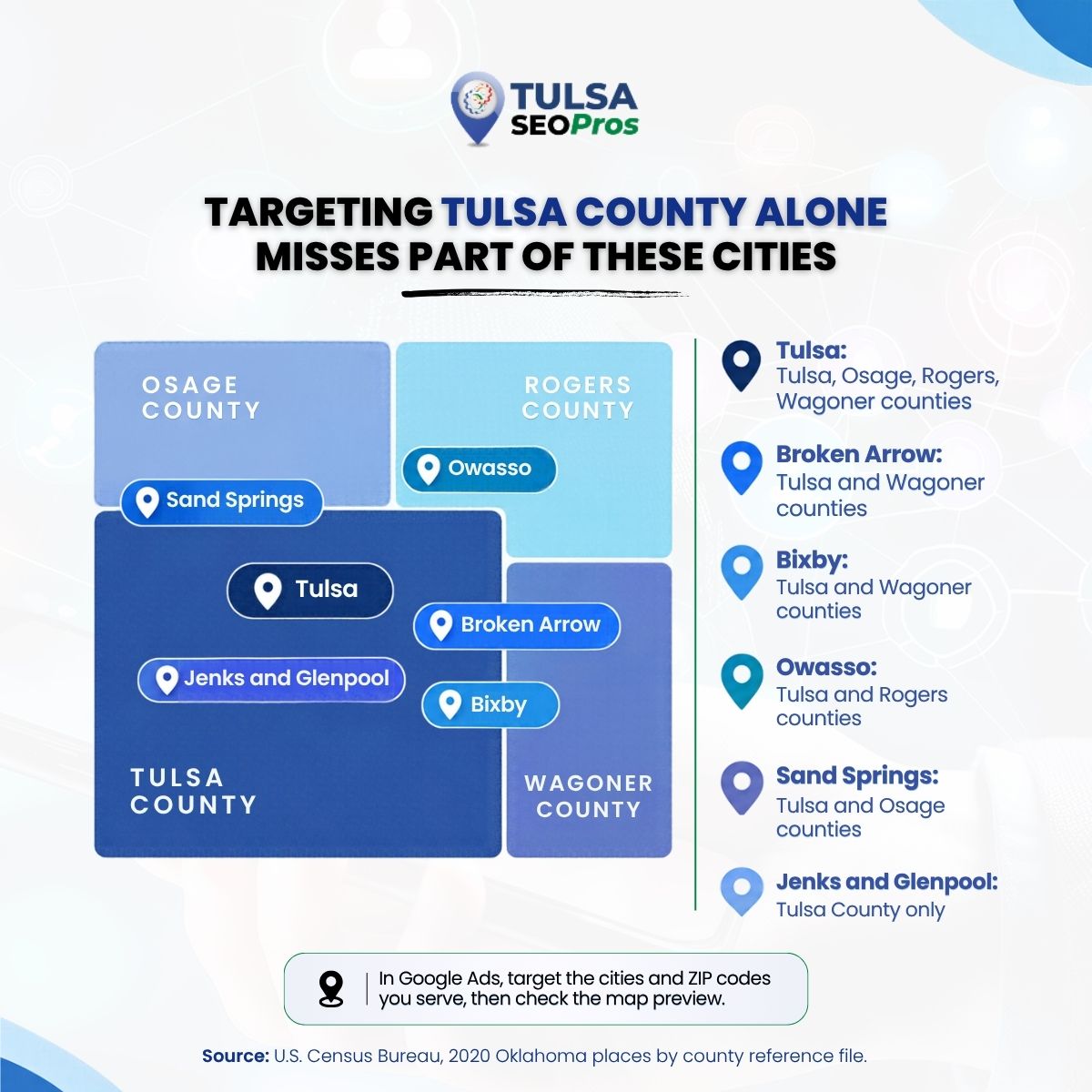
Broad match is the default match type, and negative keywords don’t cover close variants, so plurals and synonyms need adding. Auto-applied recommendations, once switched on, can add broad match keywords, search partners, and Display expansion without a fresh approval each time. For Tulsa-area plumbers, targeting by county alone also misses parts of Broken Arrow, Owasso and Bixby, which cross county lines.
Before You Touch a Setting, Decide What Counts as a Lead
Every setting below is judged by one number: calls and form requests that turn into booked jobs. If the account can’t see calls, none of the changes can be measured.
The call assets documentation says Google Ads automatically creates a default call conversion called “Call from ads” when call reporting is on, and its call reporting page says you can count calls of a specified duration as conversions. Pick a duration long enough that a wrong number or a hang-up doesn’t count as a lead. There is also a warning that counting call conversions might affect your bids if the campaign uses automated bidding, which is exactly why the definition matters.
Our overview of how plumbing marketing turns searches into calls covers the bigger picture of SEO and paid search working together. This article stays inside the Google Ads settings page.
Presence or Interest: Who Actually Sees a Tulsa Plumber’s Ad?
Anyone in your target area, plus anyone Google thinks is interested in it, unless you change the default. That default is the first setting we open in a plumbing account.
Google’s page on advanced location options describes the default, “Presence or Interest”, as reaching people who are in or regularly in your targeted locations plus people who have shown interest in them. Interest can come from the terms in a search, from having recently been in the location, or from content viewed about it. The alternative, “Presence”, shows ads only to people likely to be located, or regularly located, in the places you target.
Google recommends the broad option as its best practice, and it names the case where “Presence” makes sense: when you only want people in specific locations, not people elsewhere who are interested. A plumber who drives to the job fits that description exactly. Somebody in another state reading about Tulsa is not going to book a water heater install in Jenks.
We would switch a service-area plumber to “Presence” and then watch the numbers for a few weeks. The same page says most campaigns see fewer impressions after switching away from the default, which is the point. Fewer impressions from people who can’t hire you is a saving, not a loss.
The honest trade-off
“Presence” is not free of cost. Interest-based reach can include a real customer: a son in Oklahoma City booking a water heater replacement for his mother in Sand Springs, for example, or a landlord who lives out of state and owns rentals in Broken Arrow. Those jobs are worth having.
So before switching, look at the calls and form requests that turned into booked jobs over the last few months and ask where those customers were. If a meaningful share came from people outside the area booking for a property inside it, keep that in mind when you compare the two settings. If almost none did, the interest traffic was costing money without booking work, and “Presence” is the cleaner choice. Either way, make the change on purpose, write down the date, and compare cost per booked job for the month before and the month after rather than judging it on clicks.
County lines cut through Tulsa suburbs
Choosing the locations themselves has a local trap. The Census Bureau’s 2020 list of Oklahoma places by county shows several Tulsa-area cities spilling across county lines:
| City | Counties it sits in (2020 Census) |
|---|---|
| Tulsa | Tulsa, Osage, Rogers, Wagoner |
| Broken Arrow | Tulsa, Wagoner |
| Bixby | Tulsa, Wagoner |
| Owasso | Tulsa, Rogers |
| Sand Springs | Tulsa, Osage |
| Jenks | Tulsa |
| Glenpool | Tulsa |
Targeting “Tulsa County” alone and parts of Broken Arrow, Bixby, and Owasso falls outside the campaign. Target the cities and ZIP codes you actually serve instead, and check the map preview before saving. The location targeting help also notes that very small targets may only show ads intermittently, and that radius targeting can’t go below 1 kilometer.
Search Partners Are Switched On by Default
When you create a campaign for the Search Network, search partners are included by default. That is stated plainly on Google’s page about the Search Network, which describes partners as non-Google sites and YouTube pages where search ads can also appear.
The same page adds two cautions worth reading twice. Clicks from partner sites that display products for sale “may not always reflect highly targeted traffic”. And Google Ads doesn’t tell you which partner website showed your ad on the Search Network, unless you are running Performance Max.
For a plumber paying for emergency calls, that is a lot of unknown traffic. Our starting position:
- Switch search partners off in the campaign’s network settings.
- Run for a month on Google Search only and record cost per booked job.
- If volume is too thin, switch partners back on as a separate test with its own budget, and compare.
Treat it as a test, not a rule. Some accounts do fine with partners. The point is to decide on purpose rather than inherit it.
Why Does a Plumbing Ad Run at 2 A.M. When Nobody Answers?
Because the default schedule is “All day”. The help page on ad scheduling says campaigns are set to show ads throughout each calendar day unless you add a schedule.
That is fine for a company with a live person on the emergency line at night. It is a slow leak for a company whose after-hours calls go to voicemail, because a paid click that reaches a recording can easily turn into a call to the next plumber on the list.
Two separate controls fix this, and plumbers often set one without the other:
| Control | Where it lives | What it decides |
|---|---|---|
| Ad schedule | Campaign settings | When the ads show at all |
| Call asset schedule | The call asset’s advanced options | When the phone number and call button show with the ad |
The call assets page describes the second one directly: you can schedule a call asset to show only on certain days and hours, “for example, only when your business is answering phone calls”. A plumber who answers 24 hours can leave both open. A plumber with office hours can keep ads running at night for form requests and hide the call button until someone is at the phone.
A schedule does not cut the monthly spend by itself
One line on Google’s ad scheduling page surprises almost everyone. When a campaign uses an ad schedule, it paces toward a monthly spend of 30.4 times the average daily budget, regardless of how many days the campaign is active that month. Cutting the hours concentrates the same budget into fewer hours. If the goal is to spend less, lower the budget too.
Broad Match With a Thin Negative List
Broad match is the default match type for every keyword. Google’s keyword matching page says so, and says broad match can show ads on searches related to the keyword, including searches that “don’t contain the direct meaning” of it. The same page pairs that with a firm instruction to use Smart Bidding with broad match.
Plumbing is full of related searches that will never book a job. People search for plumbing careers, training, licensing, supplies, and do-it-yourself fixes, and all of them sit close to the words a plumber bids on.
The negative keyword page explains the catch. Negative keywords don’t match close variants, so you have to add synonyms and singular and plural versions yourself, although casing and misspellings are handled automatically. A negative list with “job” and without “jobs” leaks.
| Search intent that won’t book | Negative keywords to consider (add each form) |
|---|---|
| Careers | job, jobs, salary, hiring, apprentice, apprenticeship |
| Training and licensing | school, class, course, license, exam |
| Do it yourself | diy, how to, video, youtube |
| Parts shoppers | supply, supplies, parts, wholesale |
| Free help | free (only if the company does not offer free estimates) |
That table is a starting point, not a finished list. Read the search terms report every week for the first month. The help page for that report notes that some low-volume search terms are left out for privacy reasons, so it will not show everything, but it shows enough to find the leaks.
If you want the budget side of this worked out, our guide on what a plumbing company should spend on marketing walks through the numbers.
The Recommendations Google Applies for You
Auto-applied recommendations are the setting nobody remembers switching on. Google’s page on applying recommendations automatically says that once the feature is on, the chosen recommendations “will apply regularly”, and it can only be set at the account level.
The list of recommendation types that can be applied automatically includes several that pull straight against the settings above:
- Add broad match keywords
- Add keywords
- Expand your reach with Google search partners
- Use Display expansion
- Remove conflicting negative keywords
- Several bidding strategy changes
A plumber who spent an afternoon switching off search partners and building a negative list can have both undone by a recommendation that was set to apply automatically months ago. The feature won’t raise your budget, according to the same page, and you can review what is queued and what has been applied in the recommendations history. Check it, and switch off anything you would not approve by hand.
A Twenty-Minute Settings Audit
Open the account with this table beside you. Each row takes a couple of minutes.
| Setting | Google’s default | What we would check for a service-area plumber |
|---|---|---|
| Location option | Presence or Interest | Presence, with cities or ZIP codes you serve |
| Locations | Whatever was typed at setup | Every town you serve, not just the county |
| Networks | Search partners included | Off to start, then tested separately |
| Ad schedule | All day | Matched to when someone can take the job |
| Call asset schedule | Set separately in the asset’s advanced options | Matched to when someone answers the phone |
| Match types | Broad | Broad only with Smart Bidding and a full negative list |
| Negative keywords | Only what you add | Careers, training, DIY and supply terms, every plural |
| Auto-apply recommendations | Depends on the account | Off for anything you would not approve by hand |
| Call conversions | “Call from ads” when call reporting is on | A minimum duration that filters out hang-ups |
The PPC management we run for trades starts with this exact pass, before we write a single new ad.
Check These Five Settings Before You Raise the Budget
More budget pushed through the wrong settings only buys more of the wrong clicks. Fix the location option and the county gaps, decide on search partners, match the schedule and the call button to your phones, build the negative list with every plural, and turn off automatic recommendations you would not approve. Then measure booked jobs for a month before deciding whether the budget is the problem.
This is the settings layer of the plumbing marketing we run for Tulsa companies, which pairs paid search with the map and organic work in our local SEO guide for plumbers. If you would like a second pair of eyes on your account, Tulsa SEO Pros will go through these settings with plumbers in Tulsa, Broken Arrow, Owasso, Jenks, and Bixby and show you what we would change.