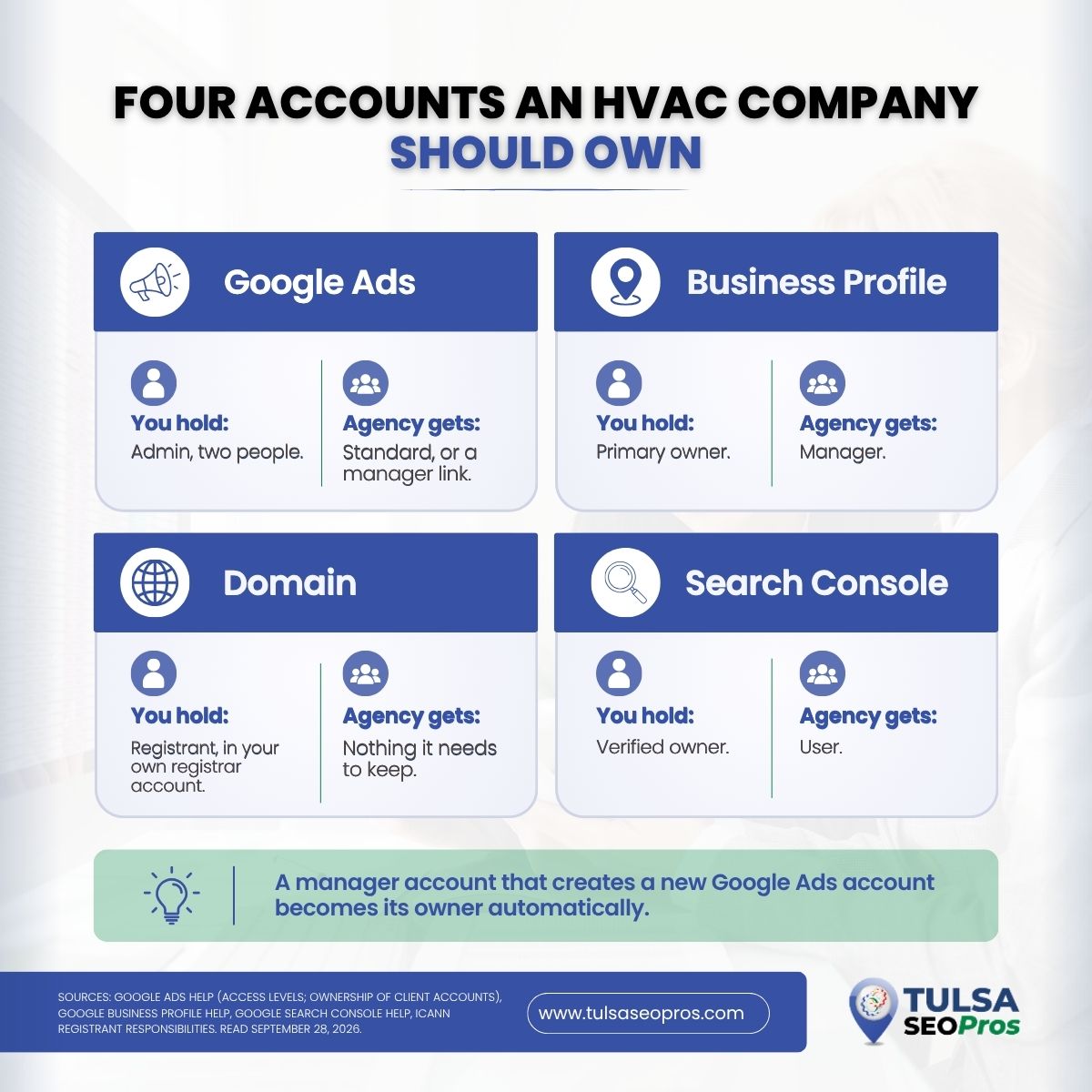
If a marketing company set up your Google Ads account, there is a real chance it is the owner, and you are a guest. Under the platform’s own rules, when a manager account creates a new ads account, that manager automatically becomes its owner. The same question applies to your Business Profile, your domain name, and your Search Console property. Before an HVAC company in Tulsa, Broken Arrow, or Owasso signs with any agency, including us, these are the four things we would want in the owner’s own name, and the contract terms that keep them there.
TL;DR
Google Ads has five user access levels, and only Admin can add users, change access levels, accept manager links, and unlink a manager. A manager account that creates a new ads account becomes its owner automatically, although the client account keeps its data and can remove that ownership by unlinking. A Google Business Profile can have several owners, but only one primary owner, and managers cannot add or remove users. A domain’s registrant carries sole responsibility for the name under ICANN’s registrant rules. Search Console needs at least one verified owner.
An HVAC contractor should hold Admin, primary owner, registrant, and verified owner status in the company’s own accounts, and give the agency lower roles that can be removed in minutes. Put that in the contract before work starts.
Who Owns a Google Ads Account When an Agency Builds It?
Whoever creates it through a manager account. The Google Ads Help page on ownership of client accounts says that if a manager creates a new account, the manager automatically becomes the owner. If a manager links to an account you created yourself, it does not get ownership by default, and your account has to switch it on.
Start there, because every other question about control follows from it.
An agency that opens the account for you, under its manager account, starts as owner.
The same page says owner admins can invite and remove users, grant or revoke admin access, accept or decline other managers, transfer ownership, and unlink other managers. That is a lot of control over an account your company pays for.
Google does draw a line under it. The client account still owns its data and keeps the ability to remove ownership access by unlinking. Only one manager can be owner at a time, and ownership passes up the chain, so every manager above the owner also has it.
How to check yours in five minutes
- Sign in to Google Ads with your own Google Account, not a login the agency gave you.
- Open Admin, then Access and security.
- Look at the Users tab. Is anyone from your company listed with Admin?
- Open the Managers tab. Is the agency’s manager account marked as owner?
- Write down who has Admin and who has ownership. That list is your baseline.
If step one fails because you have no login of your own, you have found the problem. Without a company login, nobody at the company can approve a change, so the first fix is getting one added by whoever holds Admin today.
The Five Access Levels, and the One That Matters
Google Ads gives each user one of five access levels, set out on its page about access levels in your Google Ads account. Most of what an agency does day-to-day needs Standard. The powers that decide who controls the account sit only with Admin.
| Access level | What it is for | Can it remove other people? |
|---|---|---|
| Email-only | Notification emails and reports | No |
| Billing | Billing information and payments | No |
| Read-only | Viewing campaigns and planning tools | No |
| Standard | Editing campaigns and running reports | No |
| Admin | Everything, including users, managers and product links | Yes |
The Admin-only list on that page is the part to read slowly. It covers giving account access, changing access levels, cancelling other users’ invitations, accepting or rejecting manager link requests, unlinking manager accounts, and reviewing each user’s sign-in method and last login.
Google also flags a quieter risk. If an account has only one administrator, you may lose access to your tags if that person becomes unavailable, and Google suggests adding at least one more admin. For a small heating and air company where one person set up the account years ago and nobody else has signed in since, that note is worth acting on today.
Billing is its own question
Users with Admin or Billing access can update the payments profile: the name and address, tax ID, and forms of payment. Adding or removing people on the payments profile itself is different. Google says that change has to come from the primary contact on the payments profile, through Google Ads support.
The practical point for a contractor: the card on file should be the company’s card, on a payments profile in the company’s name. If the agency pays Google and invoices you, ask in writing whose payments profile the account bills to.
What a Business Profile Owner Can Do That a Manager Cannot
Your Google Business Profile is the listing that shows in the map results when someone in Bixby searches for furnace repair. It is often the most important listing a heating and cooling company has, and the roles on it work differently from Google Ads.
The Business Profile Help page on owners and managers says a profile can have multiple owners but only one primary owner. Managers have mostly the same access as owners, with two exceptions: they cannot add or remove users, and they cannot remove the profile.
| Task | Owner | Manager |
|---|---|---|
| Add and remove users | Yes | No |
| Remove the profile | Yes | No |
| Edit hours, phone, services, photos | Yes | Yes |
| Create and publish posts | Yes | Yes |
| Respond to reviews | Yes | Yes |
Manager access lets an agency do the work.
Owner access decides who else gets in.
Three details from that help page matter when a relationship ends:
- A primary owner cannot remove themselves until primary ownership has been transferred to someone else.
- A new owner or manager has to wait 7 days before removing other owners or managers, deleting the profile, or transferring primary ownership.
- Only owners can change roles or remove other owners and managers.
So the seven-day wait cuts both ways. If you add yourself back as an owner the week you part ways with an agency, you cannot remove them until that week is up. Do it before you need it.
Is Your Website Domain Registered to You?
The domain is the one asset every other piece points at. Your ads send clicks to it, your Business Profile links to it, and Search Console measures it. If it lapses or sits in someone else’s registrar account, the rest of the marketing is standing on borrowed ground.
ICANN’s page on registrants’ benefits and responsibilities sets out who the registrant is responsible to. The registrant assumes sole responsibility for the registration and use of the domain name, must keep accurate contact information for directories such as WHOIS, and must answer the registrar within fifteen days. If renewal is automatic, the registrant has to keep payment details current.
Here is why that matters for an HVAC company in Tulsa County. The registrant is whoever is named on the registration. If an agency or a web designer registered your domain under its own name or its own registrar login, the responsibilities, and in practice the control, sit with them.
ICANN also says every registrant is entitled to review its Registration Agreement and to accurate information about its registrar’s terms, pricing, renewal and transfer processes. Ask for the registrar name and a copy of that agreement.
One email settles it.
| Question to ask | Good answer |
|---|---|
| Who is the registrant on record? | Your company’s legal name |
| Whose registrar account holds it? | An account your company logs into |
| When does it renew, on whose card? | A date on your calendar, your company card |
| Who gets the registrar’s emails? | An address at your company that someone reads |
A WordPress build can move between agencies in an afternoon if the domain and hosting logins are yours. It can take weeks if they are not.
Search Console and the Data Behind Your Reports
Most monthly agency reports start with Search Console numbers. Search Console Help, in its article on users and permissions, says a property must have at least one verified owner, proved by a token on the site, and that if the only verified owner leaves, the site should verify again to regain access.
Your company should be that verified owner. The agency can be a user.
Every figure in the lead numbers an HVAC owner should see every month is only as good as your access to the raw data behind it.
Contract Terms to Read Before You Sign
We are marketers, not attorneys, so treat this as a checklist of questions for the agreement rather than contract language. Each item maps to a setting in Google or ICANN documents.
- Google Ads: the company holds Admin on its own account, with at least two company admins. The agency gets Standard, or a manager link without ownership unless both sides agree it is needed.
- Google Ads billing: the payments profile is in the company’s name and uses a company payment method.
- Business Profile: the company is the primary owner. The agency is a manager.
- Domain: registered to the company, in a registrar account the company controls, with the renewal date written down.
- Search Console and analytics: the company is a verified owner. The agency is a user.
- Exit: on termination, the agency removes its own access and confirms it in writing, and hands over anything it built in your accounts, such as ads, landing pages, and conversion settings.
- Ad spend: paid directly by the company to Google, or passed through at cost with the invoices shown.
These terms are ordinary for a well-run agency.
A company that pushes back on you owning your own accounts is telling you something about how the exit will go.
If you are comparing firms right now, our guides on choosing a PPC agency and vetting an SEO expert in Tulsa cover the questions that come before the contract.
When the Agency Already Owns Everything
It happens, and it is usually fixable without a fight. Work through it in this order:
- Request, in writing, Admin access on Google Ads for a company email, and for the manager link to be set to non-owner or transferred. The ownership help page says an owner admin can turn off ownership or transfer it.
- Get added as an owner on the Business Profile, then wait out the 7 days before any cleanup.
- Request the registrar name and a transfer of the domain into a company account.
- Verify Search Console yourself with a token on the site, which Google documents as the way to regain access when the only verified owner is gone.
- Only then change passwords, remove old users, and end the engagement.
Keep it polite and keep it in email.
Most agencies will do this for a departing client, and a written request makes the timeline clear if one does not.
Keep HVAC Ad Accounts in the Owner’s Name From Day One
Before an HVAC company starts with any marketing firm, open the Google Ads account yourself, add the agency as Standard or link its manager account, and keep Admin. Make the company the primary owner of the Business Profile, register the domain in the company’s name, and verify Search Console. Then write those roles into the agreement.
It is the setup we recommend before any of our HVAC marketing programs for contractors across Tulsa, Broken Arrow, and Owasso. If you are not sure who holds what today, Tulsa SEO Pros will go through your Ads, Business Profile, domain, and Search Console access with you and write down exactly who has which role.